Longshot
Longshot is a free and open-source project for Windows and Linux computers. It helps users run a supported console game directly on their PC.
Longshot is not a normal emulator or an unofficial game port. It uses files from a game copy that you legally own and turns them into a program that can run on your computer. Longshot does not provide games, ROMs, game files, keys, or other copyrighted content.
The software changes the game’s ARM64 code into C and then builds it for your PC. It uses Vulkan to display the game’s graphics. This method can offer a more natural PC gaming experience.
Longshot includes many useful features, such as high-resolution graphics, ultrawide-screen support, HDR, keyboard and mouse controls, controller settings, motion controls, adjustable field of view, and mod support. It also supports technologies such as AMD FSR, NVIDIA DLSS, and Intel XeSS.
Longshot is officially available for 64-bit Windows and Linux. It can also work on SteamOS devices like the Steam Deck. Currently, there are no official versions for macOS, Android, or iOS.
The project is developed by Team MagicBean with help from its community. It receives regular updates for better performance, graphics, stability, and documentation.
Longshot is still under development, so users may experience bugs, crashes, or slow performance. Release-candidate builds are usually better for regular users. Nightly builds contain the newest changes but may have more problems.
Your PC should have a 64-bit operating system, a six-core processor, Vulkan 1.3 graphics, 4 GB of VRAM, 16 GB of RAM, and around 60 GB of free storage.
Always download Longshot from its official website or official repository.
Keep reading to learn how Longshot works and how to install it safely.
Without any further ado, let’s get started:
What Is Longshot
Longshot is a free and open-source program that helps a supported console game run directly on a Windows or Linux computer. It is different from a normal emulator. Longshot uses files from a game copy that you legally own and turns them into a program made for your PC.
The Longshot Launcher makes the process easier. It checks your game files, downloads the required tools, creates the PC version, starts the game, and installs updates. Longshot does not provide the game, ROM files, game assets, keys, or other copyrighted files. You must use your own supported game copy.
Longshot also offers many useful PC features. These may include higher resolution, ultrawide screen support, HDR, better image quality, keyboard and mouse controls, controller settings, motion controls, graphics options, and mod support.
The project is free and developed openly with help from its community. However, it is still being tested and improved. Some users may experience slow performance, errors, crashes, or other problems, depending on their computer and settings.
For safe use, download Longshot only from its official website. Read the official installation guide, system requirements, and troubleshooting pages before starting. This will help you install it correctly and avoid fake or unsafe downloads.
5 Key Features of Longshot
Free to Use
Longshot is free and open-source. Developers and other users can check its code, report problems, and help improve the project.
Runs Games on PC
Longshot is different from a normal emulator. It uses files from a game copy that you legally own and builds a version that can run on your Windows or Linux computer.
Better Graphics
Longshot supports high resolution, HDR, and ultrawide screens. It also offers graphics tools like AMD FSR, NVIDIA DLSS, and Intel XeSS. These options may make the game look better and run more smoothly.
Easy Controls
You can play with a keyboard, mouse, or game controller. Longshot also lets you change buttons, mouse speed, camera settings, and motion controls. This helps you choose the controls you like.
Simple Launcher
The Longshot Launcher makes setup easier. It checks your game files, downloads the required tools, builds the PC version, and starts the game. It also helps you get new updates.
Longshot is still being developed, so some users may face bugs, crashes, or slow performance. Always download it from the official website.
How to Download Longshot?
Follow these steps:
- Go to LongshotLauncher.com.
- Click the Download button.
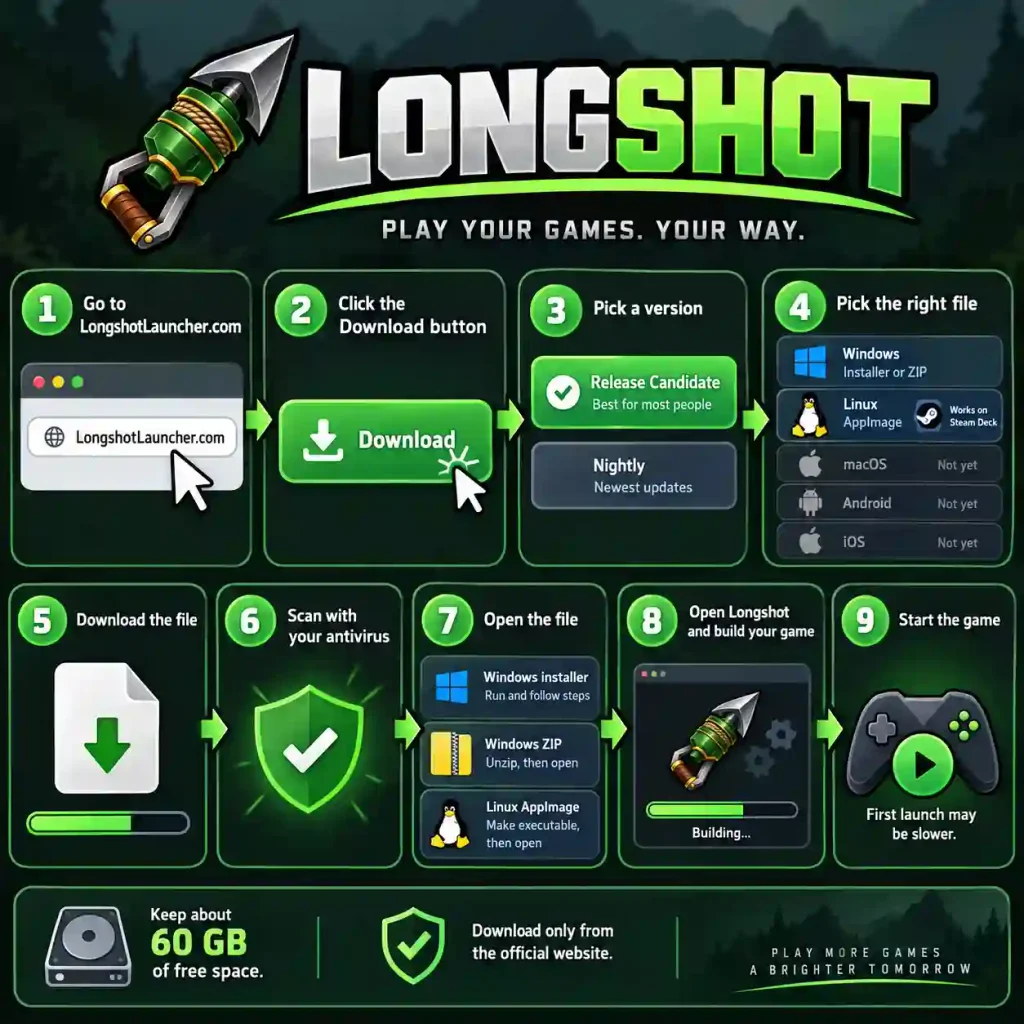
- Pick a version:
- Release Candidate: Best for most people. It has been tested more.
- Nightly: Has the newest updates, but it may have more bugs.
- Pick the right file for your computer:
- Windows: Choose the installer or the portable ZIP file.
- Linux: Choose the AppImage. It also works on the Steam Deck.
- macOS, Android, and iOS: There is no official version yet.
- Click the download link and wait for the file to finish.
- Scan the file with your antivirus app.
- Open the file:
- Windows installer: Run it and follow the steps on the screen.
- Windows portable ZIP: Unzip the file, then open the launcher from the new folder.
- Linux AppImage: Make the file executable, then open it.
- Open the Longshot Launcher and choose your own game files.
- Let the launcher build the PC version. This can take about 15 minutes or more.
- Start the game. The first launch may take longer because the shaders are being prepared.
Note: Keep about 60 GB of free space on your drive. Download Longshot only from the official website.
FAQs
What is Longshot?
Longshot is a free and open-source project. It lets you run a supported console game on a Windows or Linux PC. It is not a normal emulator. It builds a PC version of the game from files of your own game copy.
Does Longshot include the game?
No. Longshot does not give you games, ROMs, game files, or keys. You must use your own legal copy of a supported game.
Which devices can use Longshot?
Longshot works on 64-bit Windows and Linux. It can also run on the Steam Deck. There is no official version for macOS, Android, or iOS yet.
What PC do I need for Longshot?
You need a 64-bit system, a six-core processor, a Vulkan 1.3 graphics card with at least 4 GB of VRAM, and 16 GB of RAM. You also need about 60 GB of free space for the build. An SSD and a graphics card with 8 GB of VRAM are better.
Is Longshot safe and stable?
Longshot is still being developed, so you may see bugs or slow performance. Release Candidate builds are better for most people. Nightly builds have the newest changes but may have more problems. Always download Longshot from the official website to stay safe.
Longshot
Longshot is a free, open-source tool that builds a native PC version of a supported console game from your own copy. Learn how to download and install it.
Price Currency: USD
Operating System: Windows 10, Windows 11, Linux (64-bit), SteamOS
Application Category: Game
4.5